Create 8-Bit Pixel Art from Photos with 85HPicto
85HPicto, from llllevel11, is a mobile creative tool that converts photographs and hand sketches into editable pixel grids for Android users. The app automatically maps imported images into colorful, structured grids and offers multiple target resolutions so creators can control pixel density. Key functions include photo-to-pixel conversion, gallery import, editable grids, and simple animation support. It targets digital artists and retro-game hobbyists seeking quick, device-local sprite production.
What kind of tool is the app?
The app is a focused pixel-art converter that transforms standard photos and sketches into structured, editable grids. Its core loop is straightforward: import an image, let automatic mapping reduce complex colors into a grid, then refine pixels by hand. That approach positions the tool as a rapid way to produce retro 8-bit style assets from existing visuals without constructing artwork from scratch.
Can I import images and choose resolution?
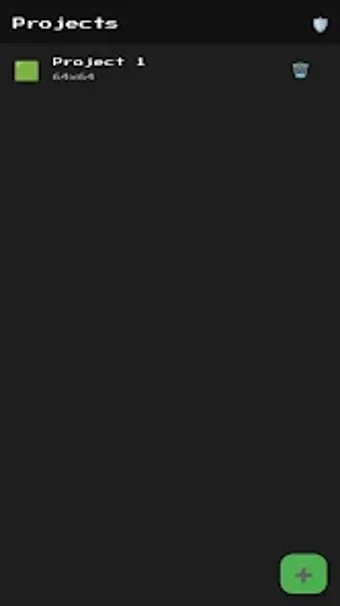
The tool imports images from local storage using gallery integration, so you can work with photographs or hand-drawn scans from your device. Users select from multiple grid sizes, explicitly including 32x32 and 64x64 options, to determine pixel density before conversion. After mapping, the editable grid lets creators tweak individual cells and assemble simple frame-by-frame animations for sprite work.
How approachable is it for hobbyists and retro creators?
The app aims at digital artists and retro-game hobbyists by offering a lightweight, specialized feature set that avoids cloud processing. Image work happens on the device and the developer states no user data is shared with third parties, which keeps projects private. That local, compact workflow suits people who want quick prototypes or practice without complex configuration or external services.
What keeps you coming back to the tool?
The standout capability is automated photo-to-pixel mapping, which speeds asset creation for short projects and exploratory sessions. The tool is presented as a specialized utility rather than a full production suite, so it fits creators who need fast sprite drafts or prototypes instead of deep, layer-based editing. Its narrow focus and simple edit/animate loop encourage repeated, short creative sessions.
An inviting pick for hobbyists who value quick, local sprite work
The app is a friendly choice for casual creators and retro enthusiasts who want a compact, device-first way to generate pixel art. It suits players of small projects and prototype designers because of its focused conversion workflow and local processing. Consider choosing it when you need fast visual experimentation rather than a full-featured, multi-layer production environment.